> For the complete documentation index, see [llms.txt](https://docs.feedotter.com/llms.txt). Markdown versions of documentation pages are available by appending `.md` to page URLs; this page is available as [Markdown](https://docs.feedotter.com/set-up-your-own-template/esp-specific-tokens/hubspot-tokens.md).
# HubSpot Tokens
Learn how to use HubSpot tokens in your FeedOtter template.
{% hint style="warning" %}
HubSpot requires specific tokens in the footer of all emails to include your company’s name, address, city, state, and an unsubscribe link.
{% endhint %}
**These are the required tokens:**
```
{{ site_settings.company_street_address_1 }}
{{ site_settings.company_state }}
{{ site_settings.company_name }}
{{ site_settings.company_city }}
{{ unsubscribe_link }}
```
Ensure these tokens are added to both the **HTML** and **TEXT** versions of your FeedOtter template. Publishing to HubSpot will work without them, but HubSpot will throw a number of warnings that can be avoided.
As a reminder, you can locate the HTML and Text versions within the Edit view of your campaign:
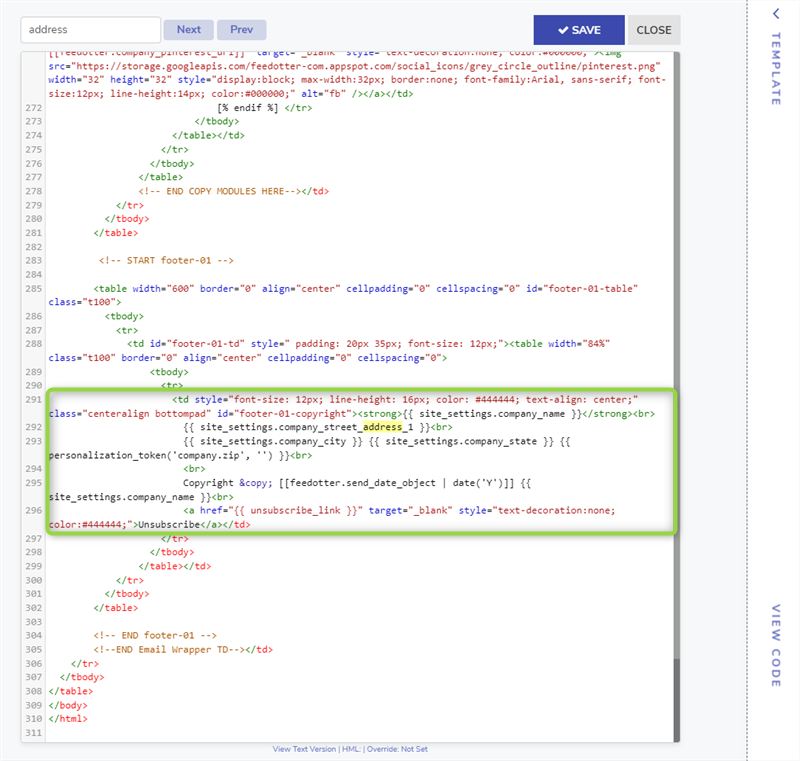
Scroll to the **bottom of the HTML email template** and scan for the footer address fields. These will be FeedOtter tokens which we will replace with the above block of HubSpot tokens.
Again, remove:
\[\[ feedotter.company\_name ? feedotter.company\_name : '' ]] AND \[\[feedotter.company\_name]] with *{{ site\_settings.company\_name }}*\
\[\[ feedotter.company\_address ? feedotter.company\_address\~' ' : '' ]] with *{{ site\_settings.company\_street\_address\_1 }}*\
\[\[ feedotter.company\_city ? feedotter.company\_city\~',' : '' ]] with *{{ site\_settings.company\_city }}*\
\[\[ feedotter.company\_state ? feedotter.company\_state\~',' : '' ]] with *{{ site\_settings.company\_state }}*\
\[\[ feedotter.unsubscribe\_link ]] with *{{ unsubscribe\_link }}*
Replace with:
{{ site\_settings.company\_street\_address\_1 }}\
{{ site\_settings.company\_state }}\
{{ site\_settings.company\_name }}\
{{ site\_settings.company\_city }}\
{{ unsubscribe\_link }}
Click **Save.**
### Alternative way to apply using the visual editor:
To update your HTML email template navigate to the **Customize tab in your FeedOtter campaign and use the Visual or Code editor to place the above tokens in the desired footer area of your email.**
**To update the TEXT version of your template navigate to Customize > Code and select "text" from the dropdown indicated below. Paste in the HubSpot tokens as shown below.**
Apply your changes, and your next HubSpot publish will be ready to send!